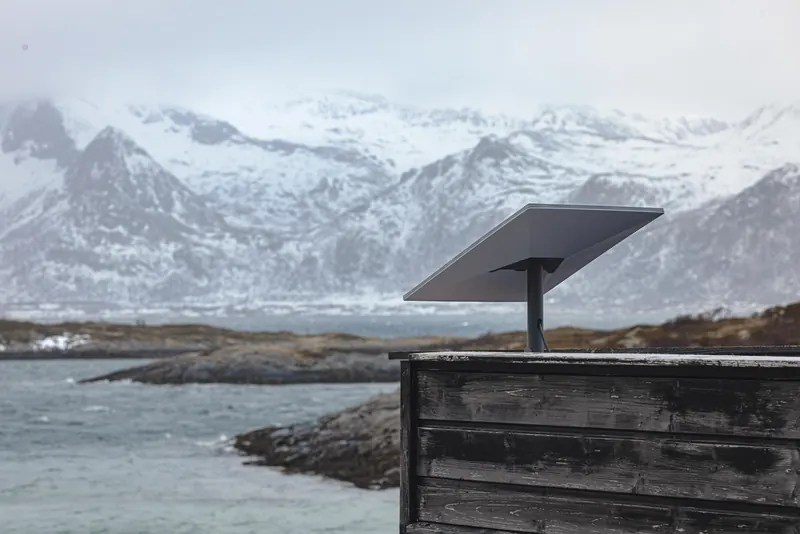
Starlink in snow and ice: what a home dish does in winter
You order on Starlink.com at its normal price. First-time customers can currently get a $100 credit there, set by Starlink.
Winter is when a lot of people find out whether their installation was good enough. Snow sits on the face of the dish. Ice builds on the cable. A steep metal roof that looked fine in October sheds heavy slides in January. And if the power goes out, the kit goes with it unless you have a backup.
This page is for a house, cabin or other fixed home on a Residential plan. For pausing a seasonal place, see Standby or cancel. For mountain-home placement, see cabin internet and home setup.
What Starlink actually claims about weather
Starlink says the residential kit is built to handle rain, sleet, wind and to melt snow. That is marketing language you will also see on the Residential page, and it is broadly true in ordinary winter weather. It is not a promise that the link never slows down.
Heavy, wet snow and a thick, wet storm can still degrade a satellite link for a while. The usual recovery is that the dish warms, the snow slides, and service returns. A dish that is buried, shaded by a drift, or knocked out of alignment by a roof slide is a different problem, and melting alone may not fix it.
Snow melt, as Starlink publishes it
| Standard kit | Performance (Gen 3) kit | |
|---|---|---|
| Snow melt, up to | 40 mm an hour (about 1.5 inches) | 85 mm an hour (about 3.5 inches) |
| Operating temperature | −30°C to 50°C (−22°F to 122°F) | −40°C to 60°C (−40°F to 140°F) |
| Average power draw, as listed | 62 W | 70 W |
| Field of view | 110° | 140° |
These figures are from Starlink's kit comparison help article. They describe what the hardware is designed to do, not what you will see in a particular storm. Performance is a heavier, more expensive kit; most homes use Standard.
Placement beats gadgets
The best winter install is still a dish that can see the sky and shed snow, with the cable run so ice and slides cannot rip it out. A slightly steeper mount often sheds better than a dish lying too flat. Keep it out from under a valley in the roof where drifts collect, and away from the path of a metal-roof avalanche.
Do not pile the kit next to a wall that dumps snow on it, and do not build a tight visor over the face of the dish. The face needs the sky, and it needs room for snow to slide off. If you go up to brush a dish, use the guidance in the app and Starlink's own care instructions; prying ice with a tool is a good way to damage the surface.
A pipe or pole mount, a few feet off the roof, can keep the kit above typical drifts. That is a real construction choice, not a weekend experiment, in snow country. Home setup covers mounts and when a professional install is worth considering. There is also a dedicated page on professional installation.
When the power goes out
Snow melt and the router both need electricity. If the house loses power, Starlink stops until power returns, unless you have a battery, an inverter or a generator already set up. Sizing that backup is its own math; this site does not sell power equipment, and the right size depends on the kit and what else you keep on.
If winter outages are common at your address, think about backup power before the first storm, not during it. The dish also needs to stay clear so that, when the power returns, it can find the sky again.
Still deciding?
See current Residential plans for a winter house
Starlink's order page shows the current home plans and hardware for your address. If the kit is not right, Starlink advertises a 30-day trial with a refund, on terms in its current policy.
Click to get your $100 credit (Starlink.com, new tab)
How the credit works: Starlink rewards first-time Residential or Roam customers who use this link once they've stayed subscribed for two months. In the U.S. it's $100 today, paid as a bill credit or cash, on terms Starlink controls.
What to do after a heavy storm
- Check the app before you climb anything. It will often tell you whether the dish is obstructed, offline or simply waiting.
- If you can see a thick cap of snow from the ground and the app shows a blockage, wait a bit if the dish still has power; melt and a slide often clear it.
- If you go onto the roof, use safe winter roof practice or hire someone who does this work. A dish is not worth a fall.
- Look at the cable entry and mounts for ice, a bent arm or a slide that moved the kit.
- Once it is clear and powered, give it a few minutes to reconnect before you assume the hardware failed.
Check Residential for your address
Enter the address on Starlink's order page to see current home plans and hardware. A sound mount matters as much in January as the plan you pick in November.
Click to get your $100 credit (Starlink.com, new tab)
How the credit works: Starlink rewards first-time Residential or Roam customers who use this link once they've stayed subscribed for two months. In the U.S. it's $100 today, paid as a bill credit or cash, on terms Starlink controls.
Snow and ice questions
Will snow shut Starlink off?
A covering of snow can block or weaken the signal until it melts or slides. Starlink designs the Standard and Performance kits to melt snow. A buried or badly placed dish can stay offline longer.
Should I buy the Performance kit just for winter?
Only if you already need that kit for other reasons. It has a higher published snow-melt rate and a wider temperature range, but it draws more power and costs more. Most homes start with Standard and a good mount.
Can I pour water or chip ice off the dish?
Follow Starlink's own care instructions. Chipping ice or using sharp tools can damage the surface. A powered dish is meant to melt snow itself.
What if the power is out too?
The kit will not melt snow or route traffic without power. A planned backup, if you need one, has to be in place before the outage.
Is a cabin in the snow different from a year-round house?
The weather is similar; the difference is whether you are there to notice a problem, and whether you pause the plan between visits. See the cabin and Standby guides.
First time with Starlink?
The $100 home credit, briefly
Ordering Starlink for the house for the first time? Begin with the button below and Starlink can credit $100 to your account after two months on a home or Roam plan. Your price at checkout stays the same.
Click to get your $100 credit (Starlink.com, new tab)
The button carries my referral code, which may also earn me a referral benefit. Starlink sets the terms and can change them.